


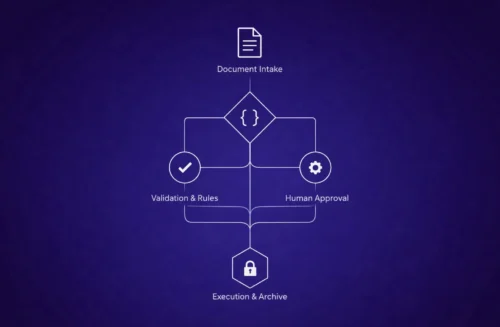
From Static Files to Living Workflows
Historically, documents were handled like physical files—created, printed, shared, filed and retrieved. Digitisation removed paper but left the workflow largely manual. A step‑change is now occurring: documents are being treated as workflows.
Automated document workflows have four core components: a trigger (the event that initiates a process, such as submitting a form or receiving a contract), routing rules that send the document to the right person or system, approvals that capture feedback and sign‑off, and an output stage where the final version is stored, distributed or integrated into other systems.
Why documents are more than files
Modern content management and automation platforms are designed to extract intelligence from unstructured data. When unstructured content is processed, your documents aren't just files — they're data‑rich, AI‑ready and ready to trigger automated workflows. The value of a document lies in the data and the processes it drives, not in the file itself.
The cost of treating documents as files
Treating documents as isolated files leads to chaos. In the architecture and engineering sector, 77% of firms miss deadlines because project information is scattered across inboxes, shared drives and spreadsheets. Workflow automation resolves this by creating a single system that routes files automatically to the right reviewer, collects timestamped signatures and ensures that everyone has access to the latest version.
Drivers for Document & Procedure Automation
Efficiency, accuracy and compliance
At its core, document workflow automation uses technology to control how documents are created, reviewed, approved and stored. The benefits are wide‑ranging:
- Save time – Automation eliminates delays caused by manual routing, endless email chains and version confusion; templates and automatic approvals move documents from draft to final faster.
- Reduce human error – Standardised templates, built‑in rules and conditional logic ensure that each document follows the correct format and meets brand and compliance requirements.
- Improve visibility and control – Real‑time tracking and audit trails let managers see exactly where a document is in the process, preventing bottlenecks and supporting compliance.
- Enhance collaboration – Shared workspaces allow geographically dispersed teams to review, comment and approve documents in one place.
- Scale efficiently – Automated workflows are repeatable and reliable; as document volumes rise, automation prevents burnout and maintains quality.
Data‑driven opportunities
About 80% of enterprise data is unstructured, sitting in PDFs, invoices, emails and CAD drawings. Traditional systems store these documents but cannot easily use the information inside. Modern document intelligence engines extract, classify and convert data, turning a mountain of PDFs into a data‑driven engine that powers workflows.
Rising automation adoption
Gartner predicts that 30% of enterprises will automate more than half of their network activities by 2026, up from less than 10% in mid‑2023. Automation platforms integrate digital signatures, e‑forms, AI extraction, process mining, low‑code/no‑code tools and RPA to deliver end‑to‑end automation.
End‑to‑End Procedure Automation
While document workflow automation focuses on individual documents, procedure automation orchestrates entire business processes from start to finish. End‑to‑end automation covers every stage: data capture, document generation, routing, approvals, execution, reporting, compliance and archiving.
Benefits of end‑to‑end automation
End‑to‑end automation delivers benefits beyond simple time savings:
- Improved efficiency – Automation streamlines processes so employees can focus on tasks only humans can perform.
- Consistency and quality – When tasks are automated, every instance follows the same high standard, increasing consistency and reducing errors.
- Modernisation – Keeping internal processes current with modern tools helps organisations remain competitive.
A blueprint for procedure automation
A practical blueprint for automating document workflows suggests starting with a quick win—automating a single approval to demonstrate value quickly—and then following a six‑step framework: audit your current document workflows, map and prioritise processes, select automation tools, build automations, test and train, and monitor and optimise.
The audit phase involves inventorying every document type, listing owners and reviewers, charting hand‑offs and recording rework incidents. By capturing baseline metrics, you reveal where time and money disappear.
Use‑case examples
A variety of workflows benefit from end‑to‑end automation:
- Employee onboarding – Automation tools generate offer letters, collect digital signatures, trigger IT account provisioning and route forms for benefits enrollment.
- Contract management – Automation platforms create contracts from templates, integrate data from CRM systems, route them for approvals, embed electronic signatures and archive final agreements.
- Compliance monitoring – Automated workflows classify documents and enforce compliance standards through classification rules and audit trails.
- Sales and procurement – Sales teams can automatically generate proposals and quotes, route them for approval, send e‑signature requests and integrate final contracts into CRM and ERP systems.
Implementation Considerations and Best Practices
Start with a clear strategy
Implementing document and procedure automation is not as simple as buying software. A clear strategy is essential. Start by articulating the goals—are you seeking faster cycle times, reduced costs, improved compliance or better customer experiences?
Choose the right technology
Selecting technology requires balancing capabilities with ease of use. Look for platforms that offer event‑triggered actions, workflow templates, document version control and push notifications. Integration with existing systems (CRM, ERP, HRIS) is crucial to avoid data silos.
Build for people, not just processes
Automation should empower people. Involve end users in design and testing. Provide training and change management to help teams transition from manual to automated workflows.
Measure and optimise
Automation is an ongoing journey. Track metrics such as cycle time, error rates, compliance incidents and user satisfaction. Use this data to optimise workflows, remove unnecessary steps and expand automation to new processes.
Conclusion
In the era of digital transformation, documents are no longer mere files; they are workflows that drive business outcomes. Automating document and procedure workflows reduces errors, accelerates cycle times, enhances compliance and liberates employees to focus on strategic work. To succeed, organisations must adopt a strategy that combines the right technology with thoughtful process design and continuous improvement.

